Web Nova

How to Add SEO Keywords and Meta Descriptions in WordPress Website: A Complete 2025 Tutorial

In today’s digital world, mastering WordPress SEO is essential to ensure your website reaches the right audience. One of the foundational elements of SEO is properly using SEO keywords and crafting effective meta descriptions to improve your site’s search engine rankings and attract more visitors. This comprehensive 2025 tutorial will guide you step-by-step on how to add SEO keywords and meta descriptions to your WordPress website, boosting your chances of ranking higher on Google and other search engines.

Why Are SEO Keywords Important for WordPress?

SEO keywords are the phrases or words that people type into search engines when looking for information, products, or services. By targeting the right keywords, you help search engines understand what your content is about and match it with relevant user queries.

For example, if your website offers WordPress tutorials, targeting keywords like “WordPress tutorial for beginners 2025” or “how to add SEO keywords in WordPress” can drive highly targeted traffic looking for exactly that content.


SEO keywords importance for WordPress sites
search-engine-optimization-research-web-nova

What Are Meta Descriptions and Why Do They Matter?

A meta description is a brief summary of your webpage’s content shown in search engine results below the page title. While meta descriptions don’t directly impact keyword rankings, they significantly influence click-through rates (CTR). A compelling, keyword-rich meta description can attract more clicks, increasing traffic to your site.

How to Find High-Ranking SEO Keywords for Your WordPress Blog

Keyword research is the first step to effective SEO. Here are some tips:

  1. Use keyword research tools like Google Keyword Planner, Ahrefs, or SEMrush to find keywords relevant to your niche.
  2. Focus on long-tail keywords (longer, more specific phrases) because they tend to have less competition and attract more qualified traffic.
  3. Consider question-based keywords for voice search optimization, e.g., “what’s the best SEO plugin for WordPress?”
  4. Analyze your competitors’ keywords to discover untapped opportunities.

For this tutorial, some focus keywords include:

  • how to add SEO keywords in WordPress website
  • WordPress tutorial for beginners 2025
  • how to add meta descriptions in WordPress

Step-by-Step Guide to Add SEO Keywords in WordPress

1. Install a SEO Plugin

The easiest way to add SEO keywords and meta descriptions in WordPress is by using SEO plugins. The two most popular ones are Yoast SEO and All in One SEO (AIOSEO). Both plugins offer user-friendly interfaces and powerful features.

  • Go to your WordPress dashboard.
  • Navigate to Plugins > Add New and search for “Yoast SEO” or “AIOSEO”.
  • Install and activate the plugin.

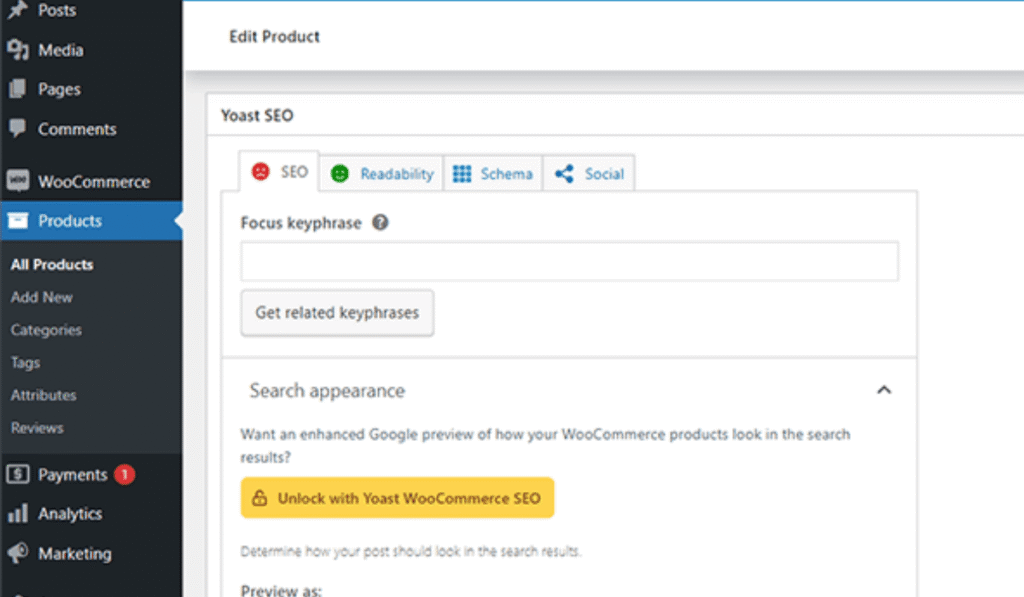
2. Add Focus Keywords in Your Post or Page

  • When editing any post or page, scroll down to the SEO plugin’s meta box.
  • Look for the field labeled Focus Keyword or Focus Keyphrase, and enter the main keyword you want to rank for, e.g., “how to add SEO keywords in WordPress website.”
  • The plugin will analyze your content and offer suggestions on how to improve keyword usage.

3. Write a Compelling and Keyword-Rich Meta Description

  • In the same SEO meta box, find the meta description field.
  • Write a concise summary of your content, including the focus keyword naturally.
  • Make it appealing to encourage users to click on your link in search results.

4. Optimize Content Headings and Body

  • Use your target keywords in your headings (H1, H2, H3) where relevant. For example, include “WordPress tutorial for beginners 2025” in an H2 heading.
  • Naturally weave keywords into your content without keyword stuffing. Quality and readability matter most.

5. Optimize URL Slugs and Image Alt Text

  • Ensure your page URLs (slugs) contain your focus keywords. For example, use:
    yourwebsite.com/add-seo-keywords-wordpress
  • Add keywords in the alt text of images to help search engines understand the image context.

Best Practices for Using Keywords Without Keyword Stuffing

  1. Use keywords meaningfully and contextually.
  2. Include variations and synonyms of your main keywords.
  3. Aim for a keyword density of about 1-2% of the total word count.
  4. Focus on user experience — write for humans, not just search engines.

How to Use LSI Keywords for Better SEO

Latent Semantic Indexing (LSI) keywords are related terms that help search engines understand your topic’s context better. For example, for the keyword “WordPress SEO,” LSI keywords might include “website optimization,” “SEO plugins,” and “Google rankings.”

Use LSI keywords throughout your blog naturally to boost your SEO without overusing your main keyword.

Voice Search Optimization: Using Conversational Keywords

With voice search on the rise, incorporating conversational keywords like questions or natural phrases is critical. Phrases such as “how do I add SEO keywords in WordPress?” mirror how users speak, improving chances of ranking for voice queries.

Conclusion and Tips to Keep Keywords Updated

Adding SEO keywords and meta descriptions in WordPress is a vital step toward higher search visibility and increased website traffic. Use reliable SEO plugins, focus on keyword research, optimize content strategically, and stay updated with SEO trends in 2025.

By implementing these techniques, your WordPress website can attract more organic visitors and achieve better rankings on search engines.

Frequently Asked Questions About WordPress SEO Keywords